|
| |
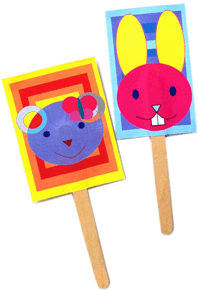 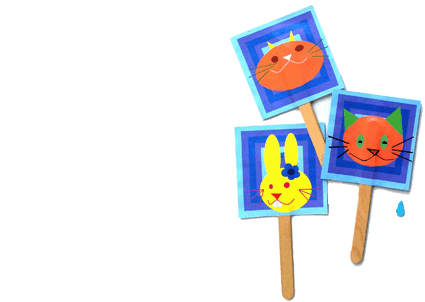 |
| Ice-cream Bookmark |
| |
| Overview of Lesson Package |
| |
| |
|
|
| Age Group: |
|
From 4 to 5 years old | Kindergarten 1 |
| |
|
|
| Classroom Size: |
|
8 students to 1 teacher |
| |
|
|
| Schedule: |
|
1 lesson per week x 3 weeks |
| |
|
|
| Time: |
|
45 mins of lesson time + 15 mins of class movement & housekeeping |
| |
|
|
| Overview: |
|
Digital media lesson (using Microsoft Paint) |
| --------------------------------------------------------------------------------------------------------------------------------------------- |
| Lesson Topic: |
|
Animal Ice-cream bookmark |
| |
| Prerequisite Knowledge: |
|
Main hardware components of a computer (screen, mouse, mousepad, keypad, on/off button, USB port, thumbdrive, power charging cable) |
| |
|
|
| New Knowledge, |
|
Students acquire: |
| Competency & |
|
- Elements of Art (Basic Shapes) |
| Skill: |
|
- Information & Communications Technology (ICT) Skill: Microsoft Paint and Microsoft Word |
| |
|
- 21st Century Competency: Critical and Inventive Thinking |
| |
|
|
| New Art |
|
Students learn the definition and application of: |
| Vocabulary: |
|
- Dark and light colour contrast to show details of a drawing clearly. |
| |
|
without drawing an outline. |
| ---------------------------------------------------------------------------------------------------------------------------------------------- |
| Lesson Objectives: |
|
At the end of the lesson, students should be able to: |
| |
|
- Observe the basic shapes in animals |
| |
|
- See and appreciate the use of shapes to draw animals |
| |
|
- Express and apply art processes involving shapes creatively |
| |
|
|
| Lesson Design |
|
Motor Skills Development: |
| Considerations: |
|
Children from 4 to 5 years old are curious and excited about the things around them. They like to make use of their five senses (see, hear, smell, touch, taste and sight) to discover new things. This lesson provides them the opportunity o practise their hand-eye coordination by drawing and colouring basic shapes with a computer mouse. |
| |
|
|
| |
|
At this age group, the children's motor skills are not yet fully developed. As such, they may find it difficult to draw a perfectly round circle for the animal's face as seen in the teacher's reference. Instead, they may sometimes draw an oval instead. Thus, to build up each child's confidence in art creation, the focus of the lesson is placed on creative thinking instead. The children are encouraged to draw freely a face shape for their animal that need not be the same as the teacher's because their animal character could have eaten a bit too much recently and have hence grown plumper. |
| |
|
|
| |
|
They are absolutely not required to copy teacher's reference with great accuracy. On the other hand, they can add in accessories such as spectacles or hair pin to personalise their animal characters and to show its gender. |
| |
|
|
| |
|
Artist Reference: |
| |
|
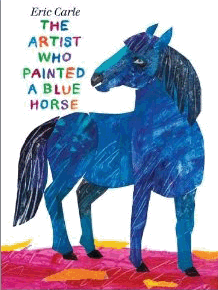
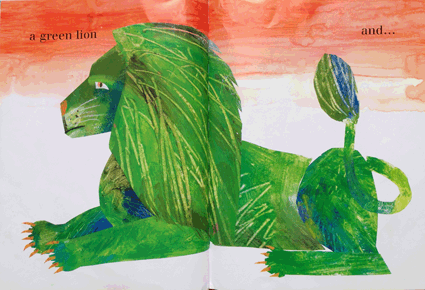
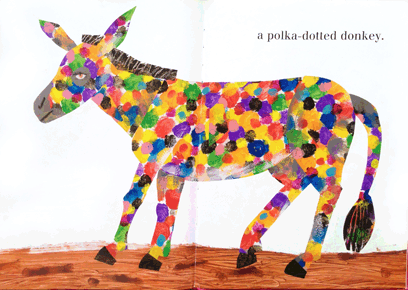
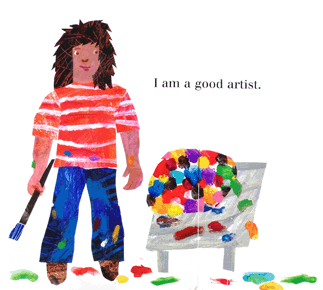
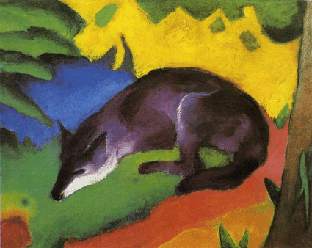
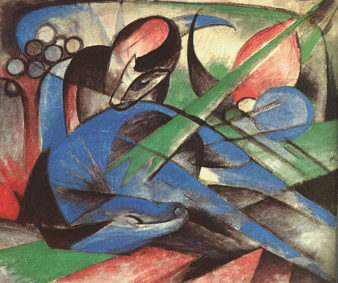
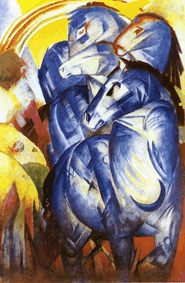
They are also encouraged to experiment with different colours for the facial features of the animals. The children are introduced to the story of "The Artist Who Painted A Blue Horse" by Eric Carle whereby the child in the storybook paints a number of animals with unconventional colors that are inspired by the modern, expressionistic and abstract works of German painter - Franz Marc |
| |
|
|
| |
|
  |
| |
|
  |
| |
|
|
| |
|
Franz Marc gives an emotional meaning or purpose to the colours adopted in his work - for example blue represents masculinity and spirituality, yellow represents feminine joy, while another colour reflects the sound of violence. The story starts with this little child saying that "I am an artist..." and eventually ends with him affirming his confidence as "a good artist" even when he follows his instincts and explores the things around him differently and imaginatively. The story hopes to encourage students to be courageous in creating their artwork, think meaningfully about the objects and colours that they adopted and also enjoy the entire creation process. |
| |
|
|
| |
|
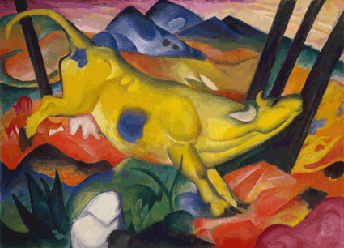
This is also a good opportunity to share with the students the unconventionally painted animals: |
| |
|
 |
|
 |
| Franz Marc, The Yellow Cow, 1911 |
|
Franz Marc, Fox, 1911 |
|
| |
|
|
| |
|
 |
|
 |
| Franz Marc, Dreaming Horse, 1913 |
|
Franz Marc, The Tower of Blue Horses, 1913 |
|
| |
|
|
| |
|
|
| |
|
Social Skills Development: |
| |
|
The children from 4 to 5 years old are learning how to do things for themselves independently. This task is designed to be challenging and yet manageable for each child to confidently complete the work by themselves. During the activity, the children are allowed to move around to check out one another's work when they have finished their own. This friendly exchange open their eyes to other possible designs and ideas from their classmates, which encourages the class to be more creative and have fun in their art-making. |
| |
|
|
| |
|
Intellectual & Cognitive Development: |
| |
|
The children become more aware with the differences in colours and this lesson provides a platform for them to learn how to mix and match colour combinations. The teacher introduces them to an art term called "light and dark colour contrast" and demonstrates how 2 different areas look much clearer when we pair them up with a light and dark contrasting colour. Demonstrate to students that if we colour both the face and nose of an animal in light colours, then we cannot see the shape of the nose clearly from afar as the colours look too similar. In contrast, if we colour the face in a darker colour and the nose in a lighter colour, then we can see the nose on the face very clearly. |
| |
|
|
| Teaching |
|
Teacher exposition (presentation) and |
| Pedagogy: |
|
demonstration (modeling the use of a new media / art making technique) |
| |
|
|
| Instructional |
|
Prepare by teacher: |
| Resources: |
|
- Coloured animal hardcopy references (cat, bear, rabbit) |
| |
|
- Portable hard disk |
| |
|
- 1 laptop to each student |
| |
|
|
| |
|
Prepare by each student: |
| |
|
- None |
| |
|
|
| ---------------------------------------------------------------------------------------------------------------------------------------------- |
| Class Rules: |
|
Number 1: |
| |
|
One person talks each time. Put up your hands when you want to share your views. |
| |
|
|
| |
|
Number 2: |
| |
|
Keep quiet and pay attention when someone is sharing his/opinion. |
| |
|
|
| |
|
Number 3: |
| |
|
Do not give careless and hurtful comments that put down other students' viewpoints. |
| |
|
Instead, explain clearly with supporting reasons why you have a different opinion on certain things. |
| |
|
|
| |
| |
| Lesson Plan |
| |
| Time |
Activity / Assessment for Learning |
Rationale |
Resources |
| 5 mins |
Get class to settle down: |
[Skillful Teacher |
Name list |
| |
- Check for absentee(s). |
Move: Routine] |
|
| |
- Fetch students to computer room. |
Get all the things |
|
| |
- Students sit together infront of a computer. |
ready at the start |
|
| |
|
of the lesson. |
|
| ---------------------------------------------------------------------------------------------------------------------------------------------- |
| 5 mins |
Lesson Recap [Knowledge]: |
Instil knowledge |
Computer |
| |
1. What are the different parts of a computer? |
and confidence |
|
| |
- Computer screen |
- On/off button |
in students to use |
|
| |
- Mouse and mousepad |
- Power charging cable |
the computer on |
|
| |
- Keypad |
- Thumbdrive and USB port |
their own. |
|
| |
|
|
Encourage them. |
|
| |
2. How do you switch on the computer? |
to listen and to |
|
| |
- Ask for a volunteer to show everyone. |
speak with |
|
| |
|
understanding. |
|
| |
3. Can you name me a few shapes? |
|
|
| |
Teacher opens up Microsoft Paint and draws the shapes as |
|
|
| |
each of them are mentioned. |
|
|
| |
- Circle |
- Triangle |
|
|
| |
- Square |
- Oval |
|
|
| |
|
|
|
| Time |
Activity / Assessment for Learning |
Rationale |
Resources |
| 5 mins |
Main Lesson: |
Food and animals |
Teacher's |
| |
1. Introduce students to lesson topic: |
are familiar things |
bookmark |
| |
- Whoever loves ice-creams put up your hand [lesson hook]. |
that are part of |
sample |
| |
- Show teacher's ice-cream bookmark sample.. |
the students’ lives. |
|
| |
- Announce lesson topic: Animal Ice-cream Bookmark |
Familiar topic |
|
| |
- Mention media used: Digital media |
serves to |
|
| |
- Software program used: Microsoft Paint |
excite students |
|
| |
|
in their learning. |
|
| |
|
|
|
| |
Identify each shape that makes up the animal: |
The reference |
Computer |
| |
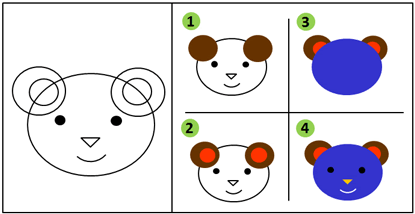
2. Draw rabbit: |
informs students |
|
| |
- Show printout of the step-by-step drawing reference. |
about how the |
|
| |
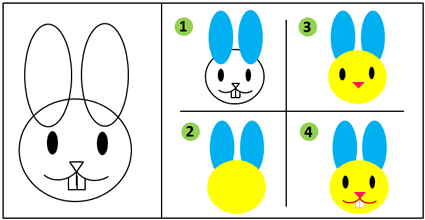 |
completed work looks like. When they are ready to work on their own drawing, this reference provides a guide for them to work at their own pace. |
|
| |
|
|
|
| |
Teacher demonstrates how to draw the rabbit: |
[Skillful Teacher |
|
| |
Keywords on shapes (Knowledge): |
Move: Clarity] |
|
| |
- Ears = 2 Ovals |
Present |
|
| |
- Face = Circle |
information |
|
| |
- Eyes = 2 Ovals |
through the use of |
|
| |
- Nose = Triangle |
explanatory device |
|
| |
- Mouth = 2 Curved lines |
- Modelling |
|
| |
- Teeth = 2 Rectangles |
Thinking Aloud. |
|
| |
|
|
|
| |
|
Students learn by |
|
| |
Encourage students to invent and think freely: |
listening to |
|
| |
- Add an accessory to show the character of the animal. |
the thought |
|
| |
- Change colours of the animal. |
process that goes |
|
| |
- "The colour of the rabbit's teeth is yellow. Do you think |
through mind |
|
| |
it has brushed its teeth today?" [humour] |
teacher's as she |
|
| |
- "Is the rabbit going anywhere today? Would you like to |
demonstrates the |
|
| |
dress her/him up?" |
drawing process. |
|
| |
|
|
|
| |
2. Colour rabbit: |
|
|
| |
Teacher teaches about creating colour contrasts even . |
|
|
| |
without drawing an outline. |
|
|
| |
|
|
|
| |
Keywords on colour (Knowledge): |
|
|
| |
- Dark and light colours = clearly seen features |
|
|
| |
even from afar |
|
|
| |
- Light and light colours = features look unclear |
|
|
| |
- Dark and dark colours = features look unclear |
|
|
| |
|
|
|
| |
3. Save work: |
|
|
| |
- Explain why is it neccessary to save the work? |
|
|
| |
To continue building up on what was done instead of |
|
|
| |
starting all over again. |
|
|
| |
- Show students where and how to save their work. |
|
|
| |
- Show how to close and open Microsoft Paint program. |
|
|
| |
|
|
|
| Time |
Activity / Assessment for Learning |
Rationale |
Resources |
| 35 mins |
Activity: |
Allow students to |
Teacher's |
| |
- Students select an animal character - bear, rabbit or cat. |
sit with their |
drawing |
| |
- Assign a computer to each student. |
friends so that |
references, |
| |
- Teacher walks around to give guidance and feedback. |
they can help |
Computer |
| |
|
one another and |
|
| |
|
exchange ideas. |
|
| |
|
Allow students to |
|
| |
|
enjoy doing |
|
| |
|
their work and |
|
| |
|
build social skills. |
|
| |
|
|
|
| |
Documentation: |
Students learn to |
Camera |
| |
- Take photos of the artmaking process to be displayed |
value and respect |
|
| |
with students' finished work in the class. |
works and ideas of |
|
| |
|
their classmates. |
|
| |
|
Knowing that their |
|
| |
|
work will be displayed, |
|
| |
|
they will take |
|
| |
|
higher ownership |
|
| |
|
and responsibility |
|
| |
|
when doing their |
|
| |
|
work as well. |
|
| |
|
|
|
| Time |
Activity / Assessment for Learning |
Rationale |
Resources |
| 10 mins |
End Lesson: |
[Skillful Teacher |
Portable |
| |
- Students save their work and return references. |
Move: Routine] |
harddisk |
| |
- Walk students back to classroom. |
When routines |
|
| |
- Teacher saves their work in portable hard disk. |
are skilfully |
|
| |
|
carried out, time |
|
| |
|
can be used |
|
| |
|
effectively to |
|
| |
|
maximise students' |
|
| |
|
learning. |
|
| |
|
|
|
| Time |
Activity / Assessment for Learning |
Rationale |
Resources |
| - |
Follow-Up: |
[Skillful Teacher |
Internet connection |
| |
- Students continue on their work for the next 2 lessons. |
Move: Momentum] |
|
| |
- Teacher starts each of the next two consecutive lessons |
Maintains the |
|
| |
with a music animation [lesson hook] - |
excitement of the |
|
| |
http://www.iloveegg.com |
lesson by showing |
|
| |
|
students what the |
|
| |
 |
professionals draw and animate using digital media. |
|
| |
|
|
|
| |
 |
|
|
| |
|
|
|
| |
Informs students that professional designers have drew |
|
|
| |
the egg character before moving them. They are actually |
|
|
| |
learning the basics of becoming a designer now. Wow! |
|
|
| |
|
|
|
| |
- Teacher reminds students the number of week(s) that |
|
|
| |
they have left to complete their work. |
|
|
| |
|
|
|
| |
Completion |
|
|
| |
- Teacher prints 2 sets of the Animal Ice-cream Bookmarks. |
|
|
| |
- One set for students to use and the other to display in |
|
|
| |
their classroom, along with photos of artmaking process. |
|
|
| |
|
|
|
| |
| |
| Teaching Resources |
| |
| |
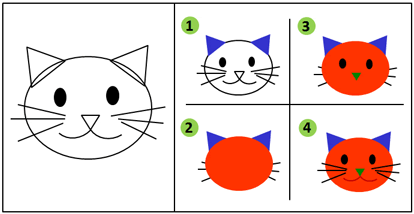
| Step-by-step drawing guide for students: |
 |
| |
|
| |
 |
| |
| |
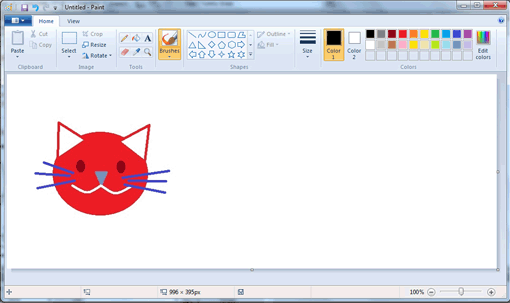
| Demonstration by teacher in Microsoft Paint: |
| The cat looks slightly different from the printed reference to encourage students to be creative. |
 |
| |
| |
| |
| |
| Students' Artworks |
| |
| |
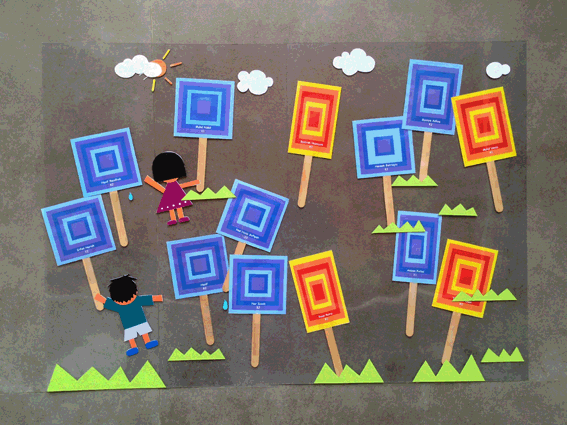
| Window display of all the students' artworks: |
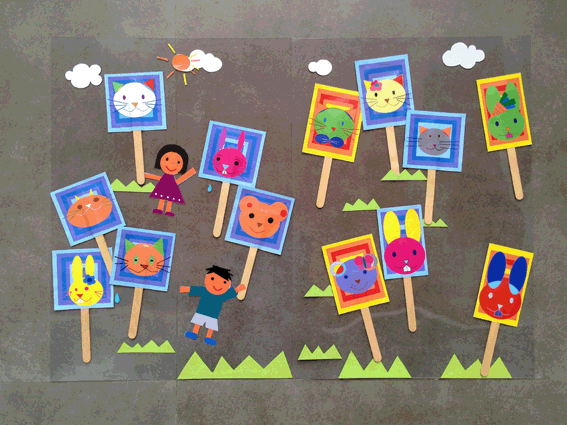 |
| |
 |
| |
| |
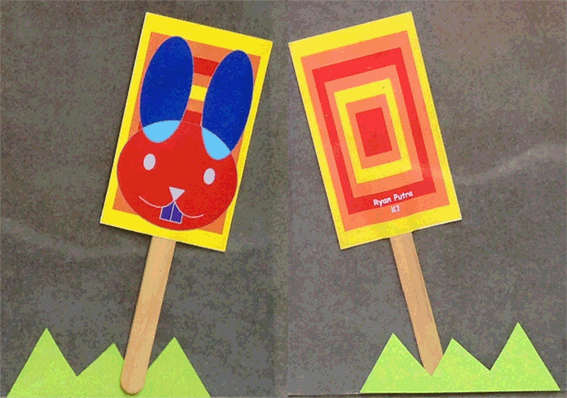
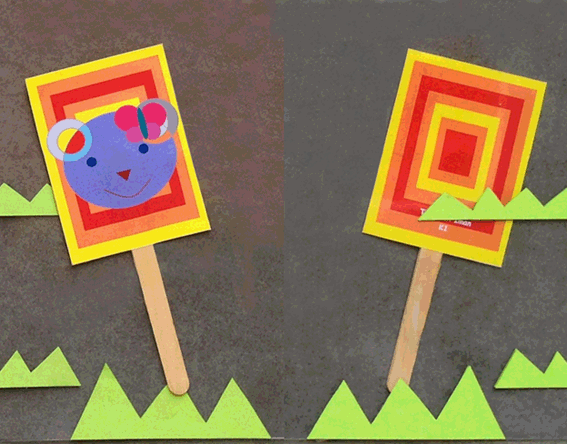
| The front and back view of an ice-cream bookmark: |
| Child's name and class level are indicated on the back of the ice-cream. |
 |
| |
| |
 |
| |
| |
| |
| |
| References |
| |
| 1. |
| Catharine Fishel. 2001. Designing For Children: Marketing Design That Speaks To Kids. Rockport Publishers, Inc, United States of America. Pp 45. |
| 2. |
| Jon Saphier, Mary Ann Haley-Speca, Robert Gower. 2008. The Skillful Teacher: Building Your Teaching Skills. Research For Better Teaching, Inc, United States of America. Pp 28, 29, 32, 69. |
| 3. |
Ministry Of Education, Singapore. 2013. Refreshed Kindergarten Curriculum Framework. http://preschool.edu.sg/wbn/slot/u3251/For%20Operators%20and%20Teachers
/Briefing%20on%20Refreshed%20Kindergarten%20Curriculum%20Framework_
Pre-school%20Sector.pdf, retrieved on 28 October 2013. Pp 7, 20, 21. |
| 4. |
| Pre-School Education Unit, Ministry Of Education, Singapore. Nurturing Early Learners: A Framework For A Kindergarten Curriculum In Singapore. http://www.moe.gov.sg/education/preschool/files/kindergarten-curriculum-framework.pdf, retrieved on 28 October 2013. Pp 10, 16, 17, 18, 28, 31. |
| 5. |
| Curriculum Planning and Development Division, Singapore. 2006. Guide To The Teaching Of N(A) & 'O' Level Art Syllabuses. Ministry Of Education, Singapore. Pp 66. |
| 6. |
| Wikipedia. 2017. Franz Marc. https://en.wikipedia.org/wiki/Franz_Marc, retrieved on 17 March 2017. |
| 7. |
| Eric Carle. 2011. The 'Blue Horse' That Inspired A Children's Book.http://www.npr.org/2011/10/08/141057271/the-blue-horse-that-inspired-a-childrens-book, retrieved on 17 March 2017. |
| |
| |
| |
| Top | Home | Dawn's Artworks |
| |
 |
| © 2026 * Dawn Lin * My Art Teacher's Portfolio ^ - ^ |